Detection Rules
Detection rules define how the platform turns raw endpoint telemetry into actionable findings. Rules are stored as JSON so they can be versioned, reviewed, tested, and rolled out without shipping a new agent build.
What a rule includes
- A stable rule ID
- A human-readable name
- A description for analysts
- A severity value
- One or more conditions
- A logic operator such as
ANDorOR - Optional MITRE ATT&CK mappings
- Created and modified timestamps
- An enabled or disabled state
Why JSON works well
- Easy to diff in pull requests
- Easy to validate in CI
- Portable across environments
- Separate from endpoint binaries
- Simple to sync from the backend
Example rule
{
  "Id": "powershell_remote_file_download",
  "Name": "PowerShell Remote File Download",
  "Description": "Detects PowerShell downloading scripts or executables",
  "Severity": "high",
  "Enabled": true,
  "Logic": "AND",
  "Conditions": [
    {
      "Field": "process_name",
      "Operator": "equals",
      "Value": "powershell.exe",
      "CaseSensitive": false
    },
    {
      "Field": "command_line",
      "Operator": "contains",
      "Value": [
        "invoke-webrequest",
        "invoke-restmethod",
        "system.net.webclient",
        "curl",
        "wget"
      ],
      "CaseSensitive": false
    },
    {
      "Field": "command_line",
      "Operator": "contains",
      "Value": "-outfile",
      "CaseSensitive": false
    }
  ]
}
Rule management view
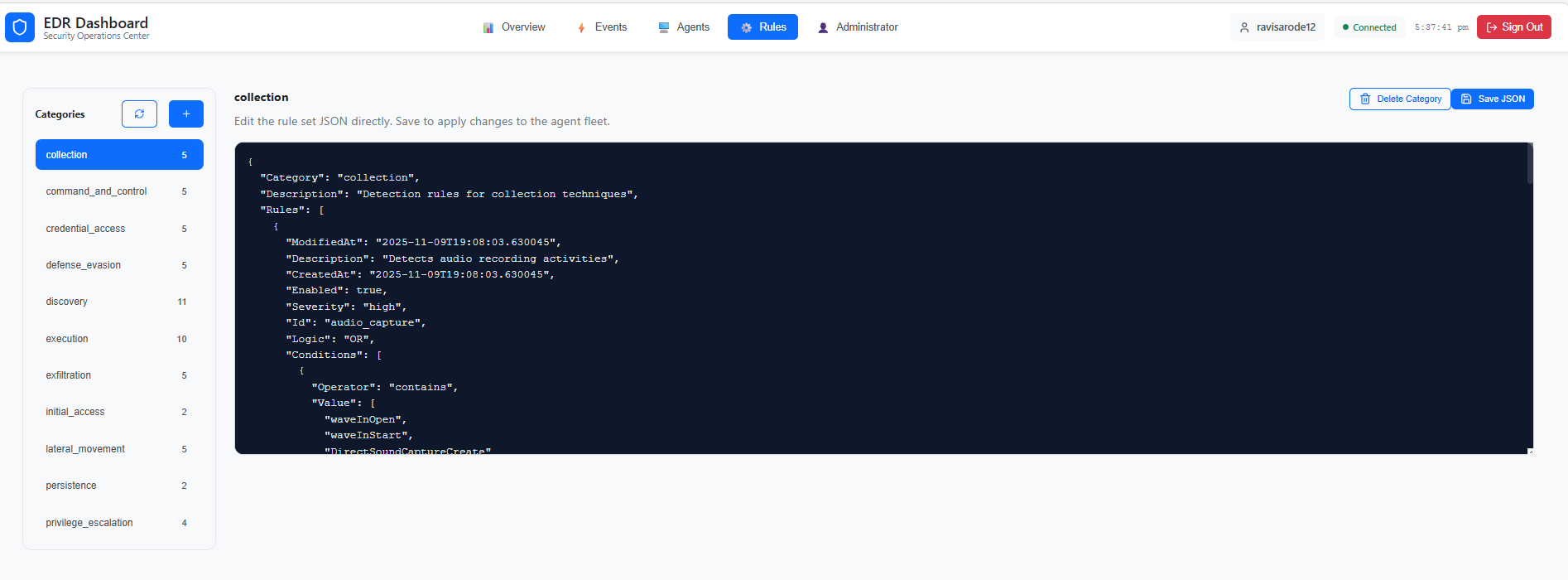
This workflow is useful when you need to:
- Review rule categories by detection area
- Edit the JSON rule set directly
- Save updated rules for distribution to the agent fleet