AI Follow-up Chatbot
The event-level AI follow-up chatbot extends the platform beyond one-time alert summaries. Analysts can ask focused questions about a selected alert and receive answers grounded in the same forensic context used for the original AI analysis.
Why follow-up chat is included
Investigations are rarely finished after the first summary. Analysts often need to ask:
- Is this process chain actually suspicious?
- Why was this alert classified as malicious, suspicious, or benign?
- Which command-line arguments matter most?
- Are there indicators that should be added to a case or ticket?
- Has similar behavior appeared before on this or another endpoint?
- What should be checked next before containment?
The chatbot keeps that exploration close to the alert so the analyst does not need to repeatedly inspect raw telemetry or switch between tools.
Context available to the chatbot
The chatbot should answer using evidence from the selected event, including:
- Event metadata and normalized fields
- Process tree and parent-child relationships
- Command-line arguments
- File, registry, DNS, and network evidence
- Rule ID, severity, and rule metadata
- Previous AI analysis for the selected alert
- Retrieved MITRE ATT&CK context and similar events from Pinecone
Event investigation view
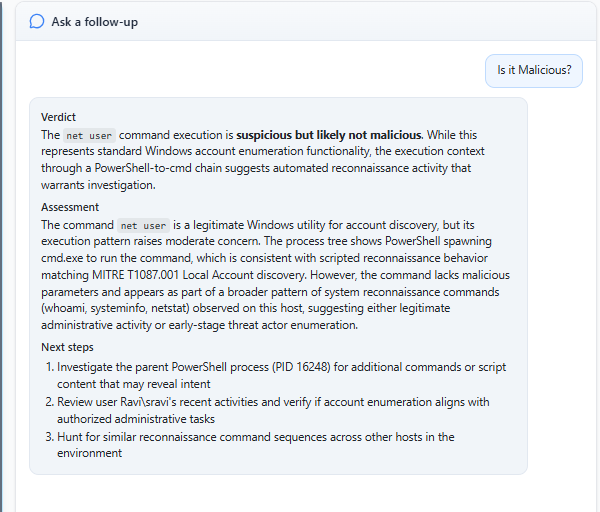
The event detail view keeps the structured AI analysis and follow-up chatbot together. This makes the workflow feel like a single investigation instead of a separate summary screen and a separate chat tool.
Broader device activity
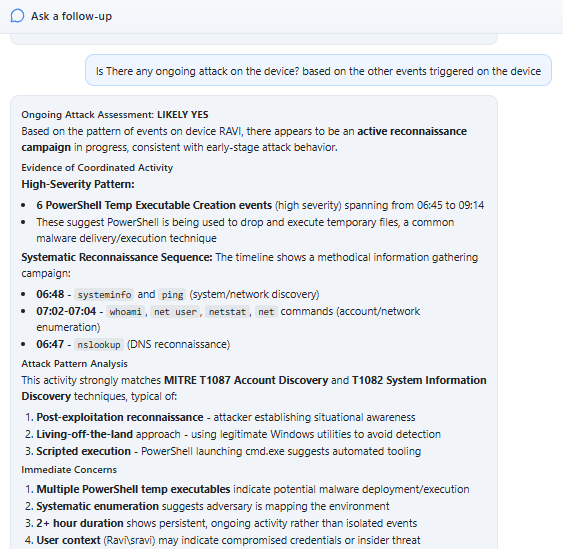
The chatbot can help analysts reason about broader device-level activity when the alert context includes related triggered events. This is useful for spotting suspicious sequences such as reconnaissance, repeated command execution, or behavior that looks harmless in isolation but meaningful in context.
Recommended actions
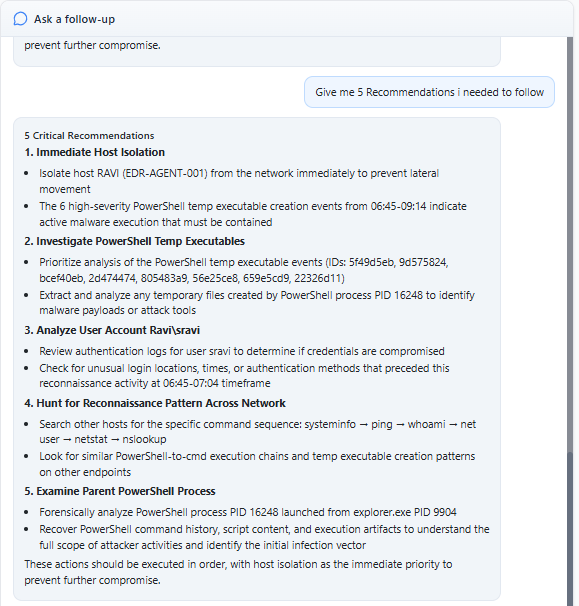
Follow-up responses can turn the alert context into prioritized next steps. The response should stay practical: what to verify, what evidence to preserve, which host or process to inspect, and what response action may be appropriate after human review.
IOC extraction
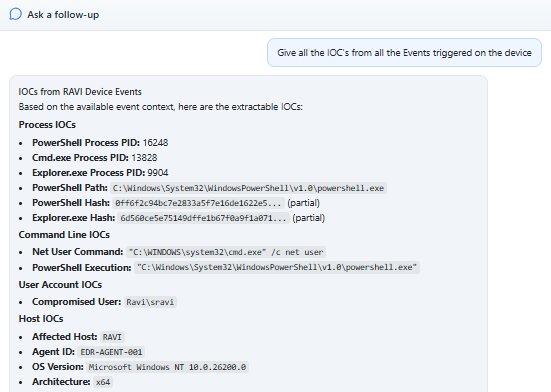
The chatbot can extract investigation-relevant indicators of compromise from event evidence, such as command fragments, file paths, domains, IP addresses, hashes, hostnames, and process names. IOCs should only be listed when they appear in the selected alert context or retrieved evidence.
Example questions
| Analyst question | Useful response should include |
|---|---|
| Is this PowerShell command suspicious? | Command-line evidence, parent process, download behavior, and matching rule context |
| Why is this a true positive? | Triggering behavior, process lineage, retrieved ATT&CK context, and confidence caveats |
| What IOCs should I record? | Domains, IPs, hashes, file paths, commands, and host identifiers present in evidence |
| What should I check next? | Prioritized follow-up steps based on process, network, file, and similar-event signals |
| Is this related to other alerts? | Shared host, process lineage, timing, command patterns, and correlation notes |